Negative Keywords at Scale: 252 Changes in Two Months, Then Almost None
 Daniel Sorenson
The short version
- Nobody reads the search terms report. Past a certain account size it stops being a document a person can work through, and the negative keyword list falls behind the account.
- A blocklist cannot fix that, because a blocklist tests words. The question is whether a search term describes something the business sells.
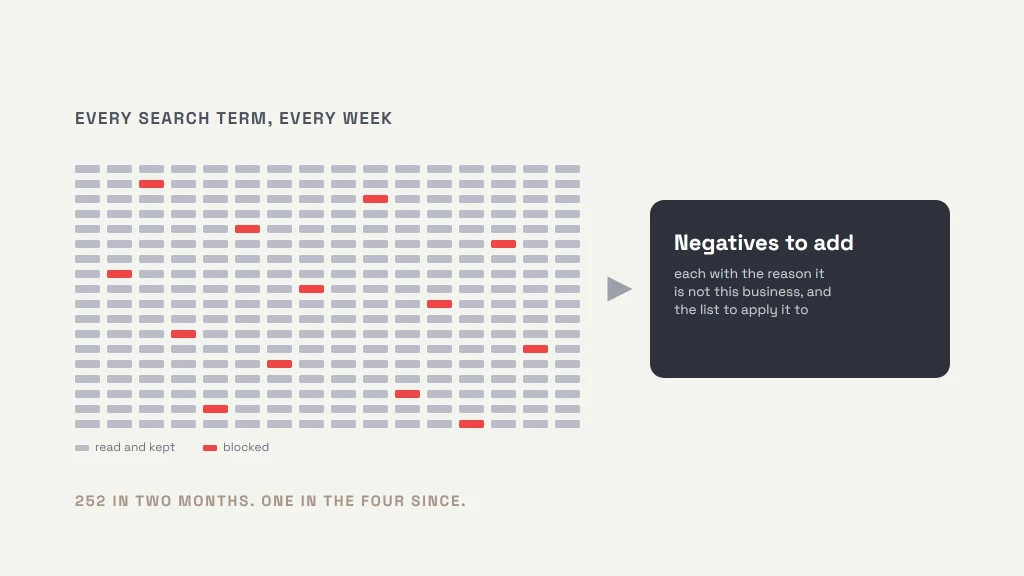
- Our system reads every search term every week, checks it against the account’s full negative list, and judges what is left against a profile of the business itself.
- On the account we built it for, 252 of the 253 negative keywords ever added went in during the first two months. One has been added in the four months since.
- That cliff is the whole point. A list that needs almost nothing is a list that has caught up with the account and is staying caught up.
- The month after the bulk of that work, the share of leads the business could actually use went from 28% to 59%, on 42% fewer leads.
Every Google Ads account has a report showing the actual phrases people typed before they saw an ad. It is the most useful information in the platform. In a small account you read it weekly, add a few negatives, and move on.
Then the account grows. At a few hundred ad groups the report takes an afternoon. At a few thousand it takes longer than the week it covers. The problem is two-fold; The exports that can be ran at the account level lose granularity to ad groups’ search terms specifically, and the exports don’t associate change history timestamp of negative keywords added.
So you run search terms report exports for a date range, review, add negatives, and repeat. Unless you build a process to recurrence, you lose track of when negatives were added and run search term reports overlapping when negatives were added, possibly adding the same negative keyword multiple times, or at least wasting time on redundant work.
This is not a discipline problem. It is a tooling problem. The data and the views you need to manage this efficiently are not centralized anywhere, so the work expands to fill more time than anybody has.
My opinion, clearly labeled as one: I do not think that gap is an accident. Fragmented reporting keeps wasted spend hard to find, and wasted spend is click revenue. I cannot prove intent and I am not going to argue it as fact. The gap is real either way, and it is the gap we built around.
Why a blocklist does not solve it
The usual answer is multiple long shared negative keyword list. Standard stuff: customer service, educational, low intent research terms, job seekers, etc. Build it once, apply it everywhere, stop thinking about it.
It helps, and it is not enough, because a blocklist tests words while the actual question is about meaning. A term can contain nothing on the list and still be irrelevant. “Free,” “jobs,” “salary,” “template,” “how to.” Those are the easy ones, and most accounts already block them. The expensive terms are the ones that look exactly like a customer: the right service and the wrong intent entirely, or a homonym.
Nothing in a word list catches those. A person catches them instantly, because a person knows what the business sells.
What we built
The system runs on a cadence that scales with the account’s volume, so a large account is reviewed more often than a small one rather than everything being reviewed monthly by convention.
Each run does three things.
It reads every search term, not a sample and not the top slice by spend. The terms that waste money are usually individually small and collectively large, death by a thousand cuts.
It checks each term against the account’s full negative keyword set: every list, every campaign negative keyword, every ad group negative keyword. Negatives accumulate across shared lists, campaign-level lists and ad group exclusions, and the practical question “is this term already blocked somewhere?” is tedious enough that it usually goes unasked. Worse, a term is applied to an ad group or campaign, and wastes spend elsewhere in the account.
Then it takes the terms that matched nothing and judges them against a profile of the business: what it sells, to whom, and what it does not do. That is the part that matters. The question stops being “does this phrase contain a banned word” and becomes “is this what this company does.” Those are different questions and only the second one is the one you actually wanted answered.
What it gives you
What comes back is a list of negative keywords to add, and for each one:
- the reason: why this term is not this business, in a sentence a person can disagree with
- which list to apply it to: shared, campaign, or ad group
The combination of these two fields are what makes the output usable.
The reason field matters because it is what makes the output arguable. Somebody who knows the business and industry can look at a recommendation, disagree, and be right. A system that only emits decisions gets switched off the first time it is confidently wrong about something, and the reason is resolving the manual process of looking up the term to understand it and judge against the business or require a question to the client.
The target of where to apply is an immediately actionable step. With a target it is a change somebody can make in the time it takes to read it. In an account with many lists, managing where a negative belongs is as much work as if it belongs as a negative keyword.
What happened
We built this for an account where a bad lead is unusually easy to identify.
The account advertises to hire rather than to sell. The role carries a requirement that most people searching the general job title do not meet, and somebody who does not meet it is not a near miss, they are somebody the business cannot employ. So every lead either qualifies or it does not, and the ratio between them is a number nobody can argue with.
That makes it a fair test. Most accounts have to infer lead quality. This one counts it.
What the system found, and then stopped finding
Every negative keyword added to that account is in its change history. Here is the whole record.
| Month | Negatives added | |—|—:| | March | 135 | | April | 117 | | May | 0 | | June | 0 | | July | 0 | | August | 1 | | Total | 253 |
252 of the 253 went in during the first two months. One has been added since.
That cliff is the finding, and it is worth being precise about what it means. It does not mean the system stopped working, and it is not a sign that anybody lost interest. It means the account ran out of waste to find.
The first two months cleared a backlog that had built up precisely because nobody could get through the report by hand. Once the backlog was gone, the number dropped to the rate at which genuinely new irrelevant terms appear, and in an account whose offering is stable, that rate is close to zero. The system still reads every term every week. It just has almost nothing left to tell us.
An account that needs one negative keyword in four months is an account whose list has caught up and is staying caught up. That is a different state from “we ran an audit last quarter,” and at this volume of search terms it is not reachable by hand.
It’s worth noting that this is one of the first reports we run during an audit, and it is where we most often find the quickest wins for a client. We know how cumbersome it is to manage by hand, which is why we built something to carry it. It does not make the judgment calls go away. It makes sure every term gets one.
What it changed for the business
The month after the bulk of that work, the composition of the leads changed.
| | April | May | |—|—:|—:| | Leads | 159 | 92 | | Met the requirement | 44 | 54 | | Qualifying rate | 28% | 59% |
Total leads fell 42%. The leads the business could actually use went up. The qualifying rate more than doubled in a single month.
We are being careful about what that does and does not prove. This is the one window where the attribution is clean: the negative keyword work is the only thing that changed in the account between those two months. From August a second system was running alongside this one on the same account, finding the weakest ad in each ad group and generating replacement copy, and the improvement from that point is the two of them together. Nobody can split it, so we will not pretend to.
The qualifying rate reached 65% by August. Only the move from 28% to 59% belongs to this system on its own.
What it does not do
It does not add keywords for you, and it does not touch the account on its own. Every recommendation is a recommendation. On an account of this size that is deliberate. The failure mode of an automated system with write access is not that it makes a bad change, it is that it makes a great many of them before anybody notices.
It also cannot tell you about demand it never saw. Search terms are a record of what already happened; finding the terms the account should be bidding on is a different job with a different data source, and one we cover in how we measure.
And it will occasionally suggest something wrong, more often from initial deployment. That is why every recommendation carries its reason, and why a person still approves the list, and a person controls updating the business context the AI leverages.
Why this sits with us rather than in a platform
Google’s own automation optimizes toward conversions it can see, within the account as configured. It has no view of what the business will not sell, or why a recorded conversion never became a sale, or which territory it does not serve, or which inquiries waste a salesperson’s afternoon. That knowledge exists in the business, and the only way a system uses it is if somebody puts it in.
That is the whole design: the same weekly review a good account manager would do, run on every term instead of the ones there was time for.
It runs on your account, not on our website
This is worth being explicit about, because tooling like this is usually sold as part of a platform you have to move onto. It plugs into the Google Ads account you already have. No site migration, no rebuild, no change of platform, and nothing to install on your website. The account is the only thing it needs.
Where a site we built does make a difference is what happens after the click. When the site, the analytics and the CRM are wired together from the start, a cleaner set of search terms can be read against lead quality, cost per lead and closed revenue, instead of stopping at the account boundary. That is what makes the search, conversion, and media work proactive rather than three separate reports. But it is an advantage on top, not a condition of entry.
This runs on client accounts today, alongside the rest of the Google Ads management work, and it is one of the reasons a small team can hold an account that would otherwise need a desk of people reading reports. If you are running more ad groups than you can review, that is the problem it was built for. Tell us what you are working with.